Delverium Controls
Keyboard, mouse, Xbox and PlayStation pads, rebinding, split-screen, and Steam Deck — without a fake full key table.
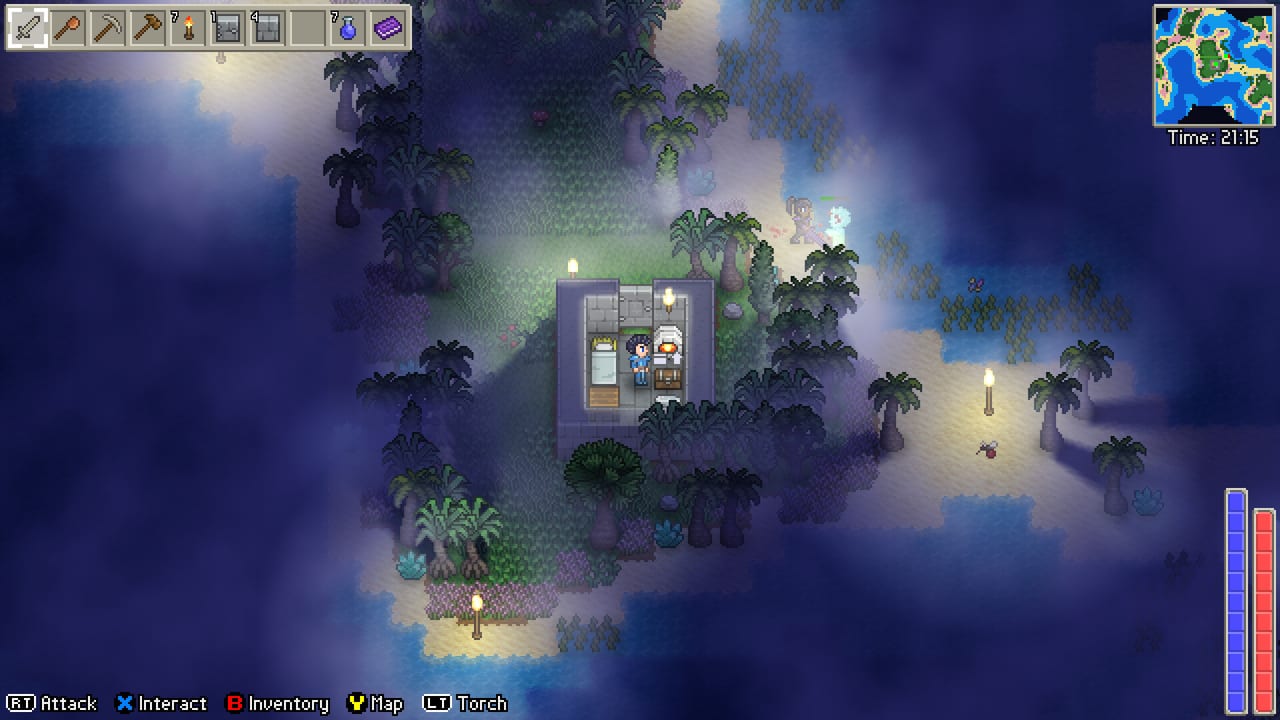
Delverium is built for a couch as much as a desk. Sagestone Games lists full controller support, keyboard and mouse, rebinding, Steam Cloud, Remote Play Together, and an official Steam Deck showing. That is a lot of input paths for a 2D sandbox where one player is placing walls while another is watering crops. This page records what the studio and demo players have actually said. It does not invent a complete default keymap that Early Access might replace on September 22, 2026.
If you have not generated a world, skim getting started first so you know why a “use/place” button and an “interact” button both exist. If you are about to host, keep co-op open in another tab. Hardware ceilings for the host PC sit on system requirements. Handheld notes sit on Steam Deck.
Keyboard and mouse (what demo footage shows)
Public playthroughs are consistent on the big motions even when they disagree on a single key:
- WASD moves the character.
- Mouse aims. Melee swings in a facing arc; bows and staves want a pointer.
- Left mouse / use swings a tool or weapon, places a selected build piece, or fires the ranged item on the hotbar.
- Scroll wheel walks the hotbar (axe, pickaxe, hammer, torch, hoe, watering can, food).
- Zoom appears as mouse wheel or plus/minus in some recordings. Use it on split-screen; four tiny HUDs are how people miss a door gap.
Interact, inventory, and map are rebindable. Demo players have mashed E, Q, F, Z, X, and space while talking to an NPC because the prompt is easy to miss when a zombie is also on screen. Do not memorize a YouTuber’s overlay. Open the options menu, look at the current bind, and change it before night one. Sagestone added a rebinding pass around the multiplayer demo update in February 2026; Early Access is supposed to keep that, not take it away.
Combat and building share the use button on purpose. That is why new players accidentally swing an axe at a villager or place a torch when they meant to talk. Put talk/interact on a key you will not confuse with place/use, then keep the torch on a hotbar slot you can hit without looking. Shift-to-torch appears in some overlays as a player habit, not as a guaranteed default.
Gamepad defaults and why people rebind
Steam lists Xbox and PlayStation controller support. In a September 2025 Steam thread, Sagestone (replying as the developer) sketched the philosophy behind the defaults:
- Left stick moves.
- Right stick aims.
- Right trigger attaches, places, or uses (tools, weapons, build pieces).
- X interacts.
They also explained why A is a messy interact bind: A is a strong default for confirming inventory slots, so using A for world interact and inventory confirm fights itself when both screens are active. The studio talked about a possible tweak — B to open inventory while the bag is closed, with A or X interacting — but told players that rebinding is the real fix. If A-to-talk is in your muscle memory from every other farm game, remap it. If you live in the inventory while nesting copper bars into a sword, keep A as confirm and leave world interact on X or a bumper.
Triggers are analog on most pads. Building walls wants a predictable place-on-press, not a half-pull that drops a door one tile off. If your pad has a hair trigger, add a small deadzone in Steam Input or in Delverium’s own options if the build exposes one. Do not stack two remappers (Steam Input plus a third-party tool) on split-screen; one player will place, the other will open a menu.
Rebinding, split-screen, and Remote Play Together
Rebinding is per player in spirit even when the UI is shared. On a 4-player split-screen, agree on a scheme before character creation:
- Player 1 (keyboard) keeps WASD and mouse so the host can type and manage the world.
- Players 2–4 get pads with the same custom layout: interact on a face button that is not also “pause,” inventory on B or Select, place/use on RT.
- Nobody binds pause to a bumper you hit while mining. The host world pausing because someone opened the wrong menu is a real co-op failure mode.
Delverium allows simultaneous split-screen and online. That is unusual and it is why this page exists. A couch of three plus five Steam friends means the TV is busy and the host’s keyboard is busy. Put the noisiest actions (building, farming water) on the couch where you can point at the screen. Put dungeon runs on players who can hear callouts. The dungeons guide assumes someone can still place a torch while strafing; that is harder on a 4-way split than on a fullscreen host.
Remote Play Together is listed on the Steam store. It is a way to share a pad-player slot without an extra Steam library copy in the room. Input latency is the tax. Building a valid NPC room (walls, door, bed, light) is painful with 80 ms of delay. Save Remote Play for combat or fishing, not for the first door.
Steam Cloud is listed too. It is for settings and progress on the same Steam account, not a substitute for “the world lives on the host.” Do not assume a guest’s rebinds travel with them to another host. Recheck binds when you join a new world.
Steam Deck
Sagestone has shown Delverium on Steam Deck and listed it in playtest notes. That is not the same as a permanent Verified badge — check the storefront on the week you play. For practical binds:
- Use the official gamepad scheme first. The Deck is a pad, not a tiny mouse, until you decide otherwise.
- Trackpads can stand in for mouse aim if you prefer keyboard-style building. Map a pad click to place/use only after you have tried RT.
- Back buttons are perfect for torch-swap and inventory. Put interact on a face button you can hit while the left stick strafes.
- Heat and battery: split-screen on a Deck is a stress test. If you are the host, prefer a wall-powered Deck or a PC host and treat the Deck as a client. Details and official footage notes belong on the Steam Deck page.
Controls that matter for each loop
Farming. Hoe and watering can are hotbar tools. Demo players described watering as lower-friction than Stardew Valley, which still means you will be holding a can and walking rows. See farming. Bind “use” so a held trigger waters a line instead of starting a melee swing because you forgot to switch off the sword.
Crafting and building. Nested crafting does not need you to click a station UI if you are in range of a workbench or furnace; you still need a precise place button for walls and doors. See crafting. The hammer is for house rocks, not for ore — keep it off the same slot as the pickaxe.
Dungeons. Right-stick aim plus RT (or mouse plus left click) is the combat language. Melee is sword/axe; ranged is bow/staff. Place torches with the same use button you fight with, which is why torch-on-hotbar discipline matters more than a fancy sensitivity slider.
NPCs. Interact is talk and trade. If interact and use are the same key, you will bonk the merchant. The players hub is useless if you cannot open the shop.
Before you chase rankings on the tier list or a verdict on the review, sit in an empty world for two minutes and test: move, aim, place a torch, open inventory, talk to nobody, pause, unpause. Then invite the second pad. Early Access is imminent; default binds can still change, but the split between use and interact will still make or break the first night. Bookmark the links hub for official patch notes if a bind file ever resets after an update.
Frequently Asked Questions
Quick answers to the most common Delverium questions.
Does Delverium support a controller?
Yes. Steam lists full controller support for Xbox and PlayStation pads, plus rebinding. Sagestone described left stick move, right stick aim, RT to use/place, and X to interact as the intended defaults.
Can I rebind keys and buttons?
Yes. A rebinding pass arrived with the multiplayer demo work in 2026. Open options and set interact away from place/use before you host co-op.
Is Delverium playable on Steam Deck?
Sagestone has shown official Deck footage and listed Deck support in playtests. Check the live storefront badge, then use the Steam Deck page for practical binds.
Who should use keyboard and mouse on the couch?
Usually the host. Building valid NPC rooms and managing the world is kinder with a pointer. Guests take pads. See getting started for why the door matters.
Why do I attack NPCs when I mean to talk?
Use/place and interact are different actions. Put them on different buttons, then keep weapons off the hotbar slot you use while standing in a shop. Trading roles are on the players hub.
Do binds sync through Steam Cloud?
Steam Cloud is listed for the game, but a guest’s layout on your host is not a universal profile. Recheck binds when you join another world or after a patch. Watch Early Access notes if a reset happens.