Delverium on Steam Deck
What the official support video shows, what full controller support means, and what this wiki will not invent.
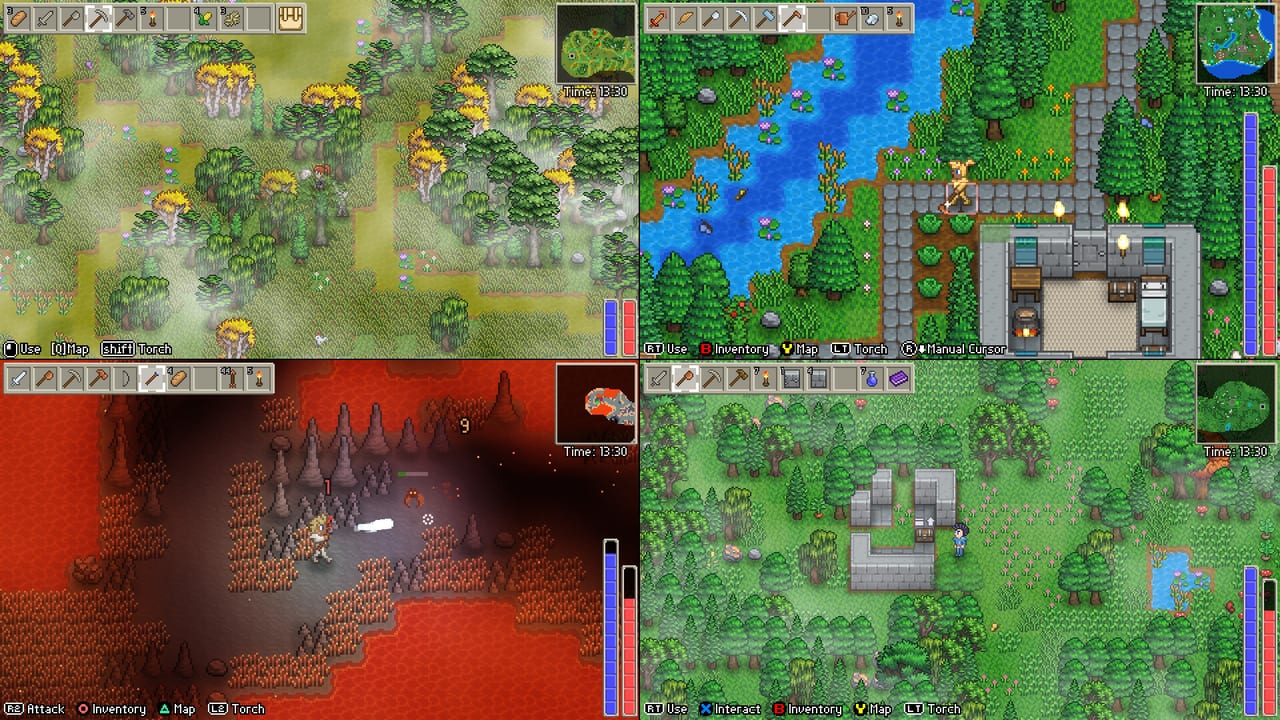
Sagestone Games posted an official YouTube video titled “Delverium - Steam Deck Support!” (the embed on this page). Press coverage around the September 22, 2026 Early Access date often shortens that to “Steam Deck confirmed.” This wiki goes one step further and one step back: yes, the studio published handheld footage and ships full controller support; no, we will not invent a Valve Verified / Playable / Unsupported badge unless Steam’s own Deck compatibility panel is cited. If a secondary article says “Verified,” treat it as marketing language until you see the badge on the store.
Delverium is a lightweight 2D sandbox. Steam’s PC minimum is Windows 10 64-bit, an i3 / Ryzen 3, 4 GB of RAM, Intel HD 4000 / GT 420 / HD 5500 class graphics, DirectX 11, and 350 MB of disk (500 MB recommended). That is not a AAA handheld stress test. A Deck’s APU is far above an HD 4000. The real questions are UI scale, inventory on a touchpad, sleep/resume, and whether you should host — not whether sprites will render.
What we can say from official materials
- Full controller support is on the Early Access feature list next to split-screen, online co-op, fishing, cosmetics, and lore.
- The February 2026 demo update added control rebinding, which is the difference between “a gamepad works” and “the Deck’s buttons match your habits.”
- Sagestone filmed the game running on a Steam Deck and put that footage on YouTube. Watch it for HUD layout and grip, not for an FPS overlay this wiki does not have.
- The demo has been on Steam since February 2025. Install that build on the Deck if you want a live test before September 22.
- Steam also lists Remote Play Together on aggregator pages. That is a way to share a PC session to a Deck, which is a different path from installing the game on the handheld.
Scott Lowther built Delverium as a family co-op game. A Deck on the sofa plus a PC host in the other room is a legitimate way to play. A Deck as the only machine in an eight-player online session is a different job: that handheld is then both renderer and simulation host.
Suggested Deck setup (not a benchmark)
These are conservative habits for a 2D title, not promised frame times:
- Install the demo or, after unlock, the full app on internal storage or a fast SD card. 350–500 MB will not fill a card; shader cache and Steam itself will.
- Use gamepad as the primary device. Open rebinding immediately if face buttons fight the inventory.
- Start with SteamOS defaults (40 or 60 Hz as you prefer). Do not chase a 4K docked preset this game does not advertise. If text feels small, check in-game UI options before installing unofficial HUD mods.
- Cap TDP only if the shell is uncomfortably hot during a long farm session. A pixel sandbox should not need a 15 W hammer; lowering TDP is comfort, not a requirement we measured.
- Test sleep. Survival sandboxes sometimes dislike suspend; if a demo session fails to resume, fully exit before pocketing the Deck until Sagestone comments.
Docked play with a bigger TV is closer to PC plus controller. Handheld play is where inventory grids and split-screen get cramped.
Split-screen and hosting on a Deck
The game supports 4-player split-screen and 8-player online, including mixed sessions. On a 7-inch 800p panel, four viewports are a curiosity more than a plan. Two local players plus remote friends is already ambitious. Prefer a TV or a PC monitor for true couch co-op; keep the Deck as a single-player or single-client machine.
Do not default to hosting on the Deck. Official worlds live on the host PC while the game is open. A Deck host must stay awake, plugged in, and on Wi-Fi for the whole session. If your group needs the farm to persist overnight, that is the dedicated server conversation (community Lodestone, not an official Sagestone binary). Specs for a desktop host are on system requirements.
Other handhelds
Legion Go, Ally, and similar Windows handhelds are just small PCs. If they meet the Steam table, they should run the Windows build. This page is named Steam Deck because that is the device Sagestone filmed. We will not copy-paste unverified “perfect on Ally X” claims. Test the demo on the device in your bag.
Proton / SteamOS compatibility for a DirectX 11 2D game is usually uneventful, which is why the studio could cut a support video. If a future Early Access build breaks Deck input or sleep, look for a Steam news note before blaming SteamOS at large.
Related reading
- Getting started — first-hour loop once buttons work.
- Co-op — invites, mixed local/online, host duties.
- Updates hub — demo history and the September 22 clock.
- Roadmap — controller work already shipped; dedicated servers still absent.
- Review — whether the slice is worth a Deck evening.
- Players and links — studio and social URLs, including Discord, X, YouTube, and Bluesky.
What this page refuses to claim
No average FPS. No battery-life minutes. No “Verified” badge. No promise that four-player split-screen is comfortable in handheld mode. No unofficial community layout IDs presented as official. Sagestone showed the game on a Deck, shipped full controller support and rebinding, and published PC specs a Deck beats by a wide margin. That is the honest handheld story until Valve’s compatibility panel or a post-launch Steam news item adds more.
If you only remember one action: install the demo on the Deck you own, play a farm-and-delve hour with the controls you rebound, and then decide whether this is your couch machine, your commute machine, or a client that should never host. The tools hub is the parent of that decision; this page is the handheld branch of it.
Frequently Asked Questions
Quick answers to the most common Delverium questions.
Is Delverium Steam Deck Verified?
This wiki does not invent a Valve badge. Sagestone published an official Steam Deck support video and lists full controller support. Check Steam’s own Deck panel for the live rating.
Will the game run well on Deck hardware?
It is a 2D title whose PC minimum is an HD 4000-class GPU and 4 GB of RAM. A Deck is far above that table, but UI scale and hosting are the real limits.
Can I host eight players from a Steam Deck?
You can try, but the world only exists while that Deck stays awake with the game open. A desktop or community Lodestone host is the better 24/7 option.
Does the demo work on Steam Deck?
The Delverium Demo has been on Steam since February 2025, including the February 2026 rebinding and co-op update. Install that build for a live handheld test.
Is split-screen sensible on the Deck screen?
The game supports up to four local views, but a 7-inch panel makes that cramped. Prefer a docked TV for couch co-op.